Tag: Adobe
In education, time is always at a premium. Between grading, preparing lessons, conducting research and managing policies, the day fills up fast — and switching between multiple systems only adds to the pressure.
AI is already embedded in daily life across higher education. Faculty use it to review research, students rely on it for study support and institutions see its potential to ease administrative workloads. Now, universities are seeking not experimental tools, but practical and secure ways to integrate AI into existing workflows.
Adobe Acrobat Studio for Education has been developed with this in mind. Rolling out from August 2025 as part of Adobe’s new higher education lineup, it allows institutions to adopt AI-enabled document workflows at a pace that suits their needs, without disrupting established systems or governance models.
What Is Acrobat Studio for Education?
Acrobat Studio for Education is a new, integrated workspace designed primarily for faculty and staff, with clear benefits for students and administrators across campus. It brings together Adobe’s trusted document tools with AI-powered insight and content creation, all within a single environment.
The platform includes:
- Acrobat Pro, providing the core PDF tools used daily across higher education for editing, converting, protecting, comparing and e-signing documents
- Acrobat AI Assistant, which allows users to ask questions of documents, generate summaries and retrieve key information with clear citations
- PDF Spaces, AI-powered workspaces where multiple documents and links can be grouped together and analysed as one
- Adobe Express Premium, offering professionally designed templates and creative tools for reports, presentations and visual communication
Rather than introducing another standalone AI tool, Acrobat Studio builds intelligence directly into the document workflows universities already depend on.
Designed for the Realities of Higher Education
Supporting Faculty and Academic Staff
Faculty members often juggle teaching, research and administrative responsibilities. Reviewing accreditation submissions, summarising research papers or preparing materials for committees can take hours of manual effort.
With Acrobat Studio, a lecturer preparing a programme review can ask the AI Assistant to summarise key changes across multiple documents or pull out evidence related to learning outcomes. PDF Spaces allow supporting material to be grouped together so nothing is missed and time is not wasted searching across folders and systems.
Helping Administrative Teams Work More Efficiently
Administrative staff across admissions, finance and governance spend a significant amount of time locating information, generating meeting notes and preparing documentation for audits and reviews.
Acrobat Studio helps by enabling instant search across long documents, automated summaries and quick retrieval of key data points. Tasks that once required hours of manual review can now be completed in minutes, freeing up time for higher-value work.
Benefits for Students
Students benefit from Acrobat Studio in more practical ways than simply having access to AI. They can organise lecture notes, reading lists and research papers into structured PDF Spaces, generate study guides from complex material and interact with documents through chat to better understand difficult concepts.
This supports more effective study without changing how or where students access their academic content.
Confidence for IT and Leadership
From an institutional perspective, security and governance remain critical. Acrobat Studio is built on Adobe’s enterprise-grade infrastructure, with encrypted data handling and controlled access. AI features operate within the trusted Acrobat environment and only analyse documents users choose to upload.
This allows institutions to support innovation while maintaining oversight, compliance and data protection standards.
Solving Licensing Complexity for Higher Education
Universities face significant licensing challenges due to diverse user needs, constantly changing student and staff numbers, tight budgets and complex vendor requirements. High user volumes, differing access levels for faculty, staff and students, and frequent turnover make it difficult to track usage and stay compliant.
Without expert guidance, institutions risk over-licensing, underutilisation or exposure during vendor audits. This makes licensing strategy a critical part of adopting Acrobat Studio successfully.
Are You Ready to Do More of What Really Matters?
Acrobat Studio for Education reflects a shift in how universities and colleges approach document workflows. It brings AI, collaboration and content creation into a single, secure environment that aligns with how higher education actually works.
Micromail is one of Ireland’s most experienced software licensing consultancies, supporting organisations worldwide across the full software lifecycle. As an Adobe Platinum Partner, Micromail works closely with higher education institutions to provide clear guidance on Acrobat Studio for Education licensing.
Talk to Micromail today to explore Acrobat Studio for Higher Education licensing options and find the right approach for your institution.
Email adobe@micromail.ie for more.
In the dynamic world of digital creativity, Adobe has once again stepped into the spotlight with the introduction of their revolutionary Firefly Generative AI Models and a user-friendly web application. This creative powerhouse, seamlessly integrated into Creative Cloud and Adobe Express, is about to redefine the way artists, designers, and content creators bring their wildest imaginations to life. Join us as we delve into the mesmerising world of Adobe Firefly, exploring its cutting-edge features and demonstrating how it empowers creators to craft captivating visuals and designs with ease.
Introducing Adobe Firefly: Where Imagination Meets Innovation
Imagine a world where your creative visions are effortlessly transformed into stunning reality. Adobe Firefly makes this possible by combining state-of-the-art Generative AI Models with a user-friendly web app, resulting in a tool that sparks the imagination of creators worldwide.
Seamless Integration with Creative Cloud and Adobe Express
One of the standout features of Adobe Firefly is its seamless integration with Creative Cloud and Adobe Express. This means that whether you’re a seasoned professional using Photoshop and Illustrator or someone looking for quick and creative solutions in Adobe Express, Firefly is right at your fingertips. No need for complex installations or separate platforms; Firefly is right where you need it to be.

AI Models for Images, Text Effects, and Vectors in Over 100 Languages
Firefly’s versatility knows no bounds. It offers a wide range of AI models tailored for images, text effects, and vectors. What’s more, it supports text prompts in over 100 languages, ensuring that creators from diverse linguistic backgrounds can access its powerful capabilities. Whether you’re adding text to your images, creating intricate vector designs, or experimenting with captivating text effects, Firefly has you covered.
Creating Stunning Content Designed for Safe Commercial Use
In today’s digital landscape, creating content that not only captivates but also complies with commercial use requirements is essential. Adobe understands this, and Firefly is designed with commercial use in mind. It has been meticulously trained on Adobe Stock images, openly licensed content, and public domain content, ensuring that the content generated is not just visually appealing but also legally compliant. Creators can confidently utilise Firefly to craft content that is ready for safe and seamless commercial use.
Trust and Transparency in AI-Generated Content
Trust and transparency are crucial when it comes to AI-generated content. Adobe is committed to providing creators with the assurance that their creative endeavours are supported by ethical and transparent AI practices. Initiatives like the Content Authenticity Initiative and the Coalition for Content Provenance and Authenticity demonstrate Adobe’s dedication to ensuring that AI-generated content is trustworthy and accountable.
Showcasing Firefly’s Innovative Features
Now that we’ve explored the core principles of Adobe Firefly, let’s dive into some of its innovative features and how they seamlessly integrate into the Creative Cloud apps you know and love.
Photoshop: Generative Fill and Expand
One of the most exciting features of Firefly is its integration into Photoshop. With Generative Fill and Expand, you can use simple text prompts to add or remove content from any image. Need to extend the background of a photo seamlessly? Firefly has you covered. This powerful feature allows you to create images that are not only visually striking but also incredibly versatile.
Illustrator: Generative Recolour
In Adobe Illustrator, Firefly introduces Generative Recolour, a game-changer for designers. With a few simple text prompts, you can unlock endless colour combinations, making the process of experimenting with different colour schemes faster and more intuitive than ever before. Whether you’re designing logos, illustrations, or any other graphic element, Generative Recolour will become your new go-to tool.
Adobe Express: Text to Image and Text Effects
Adobe Express is known for its versatility, and Firefly takes it a step further with its Text to Image and Text Effects features. Now, creating social posts, videos, flyers, banners, and cards has never been easier. You can generate captivating visuals and text effects that are sure to grab your audience’s attention, all within the user-friendly interface of Adobe Express.
Examples of Firefly in Action
To truly understand the magic of Firefly, let’s take a look at a few real-world examples of how it can assist in creating captivating visuals and designs:
Social Media Graphics
Imagine you’re a social media manager looking to create eye-catching graphics for an upcoming campaign. With Firefly’s Text to Image feature in Adobe Express, you can simply enter your promotional text, and Firefly will generate visually stunning graphics that align perfectly with your brand identity.
Vector Design
A graphic designer tasked with creating vector illustrations can now leverage Firefly’s Generative Recolour feature in Illustrator. By providing a few text prompts related to the desired colour scheme, Firefly can generate a variety of colour options, streamlining the design process and enabling the creation of diverse, visually appealing vectors.
Video Content
Video content creators often face the challenge of altering the weather in their footage to match the desired mood. Firefly’s Generative Fill and Expand feature in Photoshop makes this task a breeze. By inputting text prompts related to weather changes, creators can seamlessly transform their video content to convey the desired atmosphere.
Get the Right Licencing
Adobe Firefly is a creative powerhouse that’s set to transform the way we approach digital creativity. With its innovative features, seamless integration into Creative Cloud apps, and commitment to trust and transparency, Firefly empowers creators to bring their wildest imaginations to life while ensuring their content is ready for safe commercial use.
And as you embark on your creative journey with Firefly, remember that Micromail, an Ergo Company, is here to provide you with the licensing and strategic support you need to maximise your creative endeavours. Together, we can shape a future where creativity knows no bounds, all while maintaining the highest ethical standards in content generation. Unlock the potential of Adobe Firefly today, and let your imagination soar.
In the ever-evolving world of digital design and visual content creation, the pursuit of creativity and innovation has led to remarkable advancements. Among these, Adobe Substance 3D has emerged as a ground breaking software, captivating the imagination of artists, designers, and creative professionals worldwide. This cutting-edge tool, brought to you by Adobe, opens up a whole new dimension of possibilities, empowering users to effortlessly craft stunning 3D models, textures, and materials with unmatched realism and creative freedom.
The Power of Adobe Substance 3D
At the heart of Adobe Substance 3D lies a powerful set of features that revolutionise the way designers and artists approach their craft. With an intuitive and user-friendly interface, even those new to 3D design can quickly find themselves creating intricate and mesmerising works of art.
One of the standout features of Adobe Substance 3D is its extensive library of pre-built materials. This treasure trove of textures and materials allows users to add depth, authenticity, and lifelike qualities to their designs without starting from scratch. Whether it’s crafting photorealistic environments for video games or designing jaw-dropping visual effects for films, Adobe Substance 3D streamlines the creative process and ensures top-notch quality.
Moreover, the software supports an array of file formats, making it highly versatile and compatible with various digital design workflows. It seamlessly integrates with popular 3D modelling tools, animation software, and game engines, making collaboration and asset-sharing effortless for creative teams.
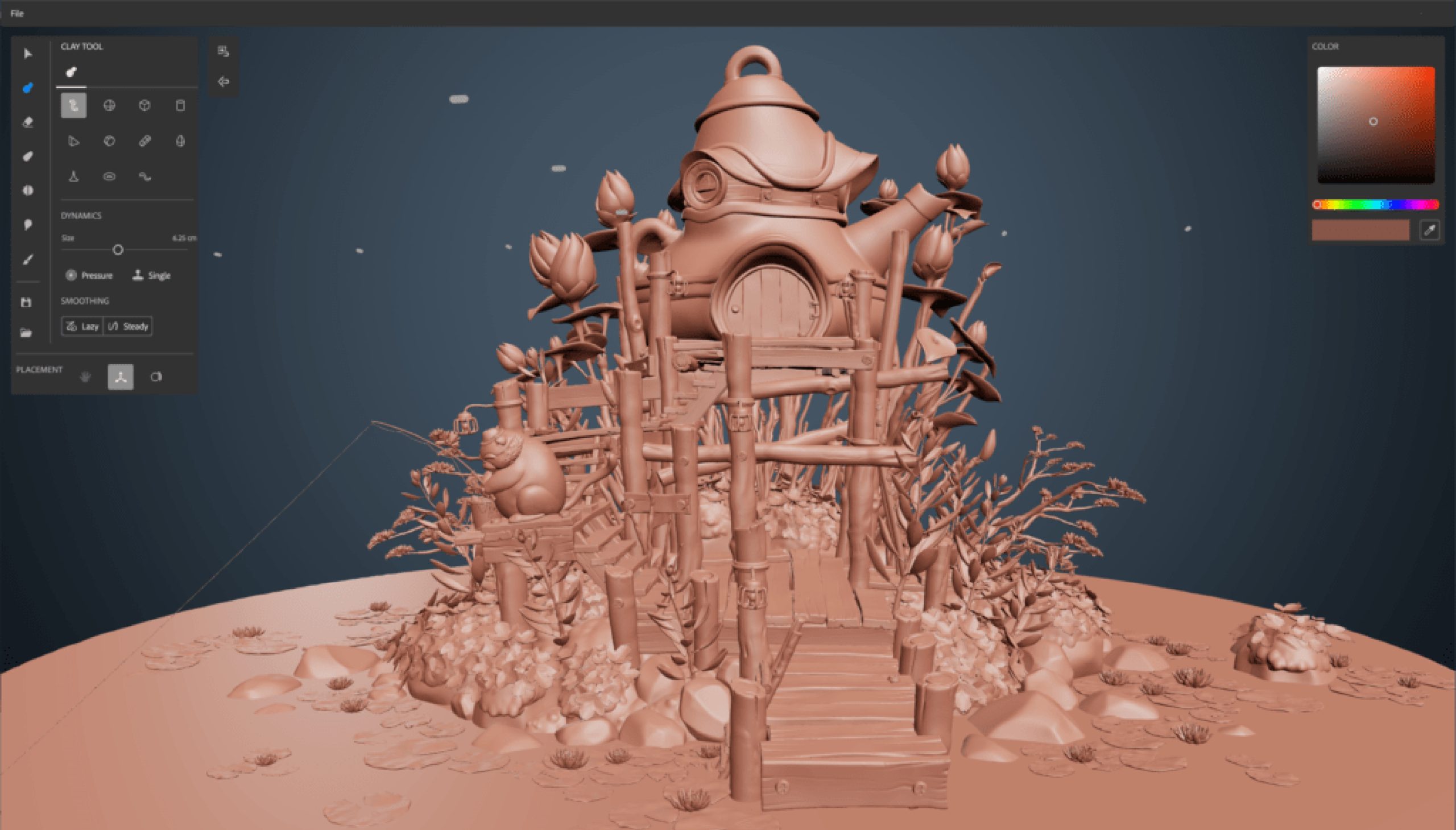
Elevate Your Designs to New Heights
Adobe Substance 3D transcends the boundaries of traditional design, empowering creators to bring their wildest ideas to life with unprecedented realism and creativity. With its state-of-the-art rendering capabilities, designs crafted with Adobe Substance 3D are not just images but living, breathing works of art that leave a lasting impact on the audience.
Imagine conceptualising a new product, designing an architectural masterpiece, or creating a captivating virtual world – Adobe Substance 3D allows designers to visualise and communicate their ideas with unparalleled clarity and impact. As a result, artists can focus on the artistic vision, knowing that the software can handle the technical intricacies with ease.
Unleashing the Potential of Creativity
Adobe Substance 3D is not just a tool; it’s a catalyst for unleashing the full potential of creativity. It equalises 3D design, making it accessible to artists of all skill levels. No longer restricted to a niche group of experts, 3D design becomes an arena where anyone with a spark of creativity can thrive and leave their mark.
Beyond the realm of entertainment and art, Adobe Substance 3D is making its mark in industries such as manufacturing, product design, and marketing. Businesses can now create compelling product visualisations, virtual showrooms, and interactive marketing campaigns that engage customers like never before.
The Seamless Implementation Partner: Micromail
To fully harness the capabilities of Adobe Substance 3D and navigate its potential, partnering with the right consultancy is essential. This is where Micromail, a licensed partner of Adobe and a leading software licensing consultancy in the UK, plays a pivotal role.
Micromail’s expertise and experience in the software industry enable them to provide tailored solutions that align with specific needs. Their team of experts collaborates closely with creative professionals to ensure a seamless implementation process, eliminating any hurdles that may arise during adoption. Whether it’s individual artists or large creative teams, Micromail’s dedication to success and ongoing support ensures that Adobe Substance 3D becomes an invaluable asset in the creative toolbox.
Ignite Your Creative Journey
With Adobe Substance 3D and Micromail by your side, the possibilities are limitless. Artists, designers, and creative professionals can embark on a journey of self-expression and ingenuity, exploring the uncharted territories of digital design.
From crafting breath taking visuals to immersing audiences in virtual experiences, Adobe Substance 3D fuels creativity and ignites the spark of innovation. It transforms ideas into reality, breathing life into every stroke, every texture, and every detail of the design.
Embrace the Creative Revolution
In conclusion, Adobe Substance 3D represents a paradigm shift in the world of digital design and visual content creation. This cutting-edge software empowers creators to transcend the ordinary, unleashing their creative brilliance with unparalleled realism and ease.
Whether you’re an individual artist seeking to redefine your art or a creative team striving to create captivating visual experiences, Adobe Substance 3D is the catalyst that sets your creativity free. Embrace the future of design and elevate your work to new heights with Adobe Substance 3D today.
To learn more about Adobe Substacne 3D and how it can help your business, contact Micromail today
Some Micromail customers may have received the following Adobe email informing users about a migration to a unified Adobe cloud storage facility. This Blog explains the notification in more detail.

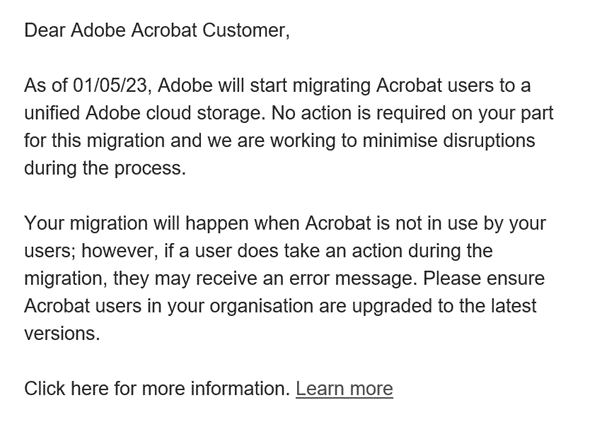
Adobe Document Cloud storage is migrating to Adobe cloud storage, which will streamline file storage and increase the efficiency of file operations in Acrobat. The change involves infrastructure optimizations and improvements, unlocking new value in Acrobat, including advanced collaboration workflows, support for deep integrations with third-party collaborative apps, and enterprise-wide adoption of PDF services.
Benefits of Adobe Cloud Storage
- Efficient Storage: Enhances storage efficiency and file-handling capabilities.
- Seamless Sharing: Facilitates smooth collaboration between users on shared documents and creative assets.
- Better Performance: Reduces latency in cloud-based operations and workflows involving documents and creative assets.
- Scalable Infrastructure: Provides better controls and a regional data center, which accelerates enterprise adoption.
- Unified View: Presents a consistent user experience on shared assets for both Adobe Creative Cloud and Acrobat users.
- Global Presence: Adobe cloud storage is available across multiple geos and a wide range of devices.
Changes with Migration
- Adobe Creative Cloud files will be supported in shared cloud storage for Acrobat users with both Acrobat and Adobe Creative Cloud assets.
- Acrobat files will be available under Cloud docs within Adobe Creative Cloud desktop and website for Adobe Creative Cloud users.
- The user experience around file access workflows for Recents, Favorites, and Reopen on the last closed page will remain the same.
- Keyword search based on metadata, shared links, files (Shared By Me, Shared With Me), and full-text search capabilities remain unaffected by the change.
- Storage limits remain the same for all users, whether free or paid.
Frequently asked questions
Q: Will my assets migrate automatically?
A: Yes, all your assets will migrate automatically to the unified Adobe cloud storage. You don’t need to take any action, and the migration will not cause data loss.
Q: Will my storage allocation change with the migration?
A: No, your storage allocation remains the same per your product entitlements.
Q: Will the migration affect new or existing users?
A: New users are already supported on Adobe cloud storage, so the migration impacts only existing users.
Q: Will the migration occur across Geos?
A: Yes, the migration impacts users in all geographic locations.
Q: Which Acrobat versions are supported on Adobe cloud storage?
A: The compliant version (released in January 2023) of Acrobat Desktop, Acrobat (Android/iOS), Scan (Android/iOS); and the February 2023 released version for Adobe Fill & Sign (Android/iOS) is supported on Adobe cloud storage.
For more information, see Migration of Adobe Document Cloud to Adobe cloud storage.
If you have any further questions, please email the Micromail Adobe team adobe@micromail.ie and we will get back to you promptly.