Author: granitewordpress
Are you a .NET developer looking to take your coding experience to the next level? JetBrains ReSharper, an essential Visual Studio extension tailored to .NET developers, is here to enhance your development process and the quality of your code. Trusted by developers worldwide, ReSharper is designed to streamline coding in Visual Studio.
ReSharper, a core component of the dotUltimate licence, is the Visual Studio extension for .NET developers, promising to take your coding experience to new heights. The best part? Acquiring your ReSharper licence is a seamless process through Micromail, a leading software licensing consultancy in Ireland. In this article, we’ll explore the impressive features of ReSharper, its numerous advantages for .NET development, the compelling reasons to consider an upgrade to ReSharper 2023.2, and the valuable offerings that come bundled with a dotUltimate licence from Micromail.
How ReSharper Helps Visual Studio Users
ReSharper, an integral component of the dotUltimate licence, is a game-changing tool for .NET developers. It’s designed to enhance your coding experience in Visual Studio and empower you with a set of features that truly make a difference.
Analyse Code Quality
ReSharper enables on-the-fly code quality analysis for a wide range of languages, including C#, VB.NET, XAML, ASP.NET, ASP.NET MVC, HTML, and XML. It’s like having a code quality watchdog at your side, instantly alerting you to areas in your code that need improvement.
Eliminate Errors and Code Smells
Not only does ReSharper identify issues in your code, but it also provides an extensive library of quick-fixes to automatically resolve problems. Whether it’s errors, warnings, or code smells, ReSharper offers a variety of options to keep your codebase clean and efficient.
Safely Change the Code Base
When it comes to making changes in your codebase, ReSharper’s automated solution-wide code refactorings are a lifesaver. Whether you’re reviving legacy code or restructuring your project, you can rely on ReSharper to make these transformations with confidence.
Instantly Traverse the Entire Solution
ReSharper’s navigation capabilities are nothing short of amazing. You can effortlessly search and navigate through your entire solution, jumping to any file, type, or type member. You can also navigate from a specific symbol to its usages, base and derived symbols, or implementations. This level of navigation efficiency boosts your productivity significantly.
Enjoy Code Editing Helpers
ReSharper enhances your coding with a range of editing helpers, including extended IntelliSense, instant code transformations, auto-importing of namespaces, code rearrangement, and code documentation display. These features streamline your coding tasks, saving you time and effort.
Comply with Coding Standards
Maintaining coding standards is crucial for team collaboration. ReSharper makes it easier with its code style and formatting functionality, allowing you to establish a consistent coding standard for your team.
Why Upgrade to ReSharper 2023.2?
ReSharper 2023.2 isn’t just an upgrade; it’s a leap forward in enhancing your coding experience. The latest version introduces a range of new features and improvements that make it a compelling choice for .NET developers. Whether you’re looking to work more efficiently with raw string literals, improve code readability with local functions, or streamline Entity Framework issues, ReSharper 2023.2 has you covered. It even simplifies unit testing by enabling effortless navigation and test creation.
ReSharper 2023.2 brings several enhancements, making it an even more attractive choice:
Improved Support for Raw String Literals: Working with raw strings is now more efficient with new C# inspections, context actions, and formatting options.
New Inspections for Local Functions: Enhance code readability with new inspections, quick-fixes, and hints for local functions.
Better Handling of Entity Framework Issues: ReSharper offers inspections, quick-fixes, and navigation support for common issues when working with ORM frameworks like Entity Framework.
Navigating and Creating Unit Tests: With major updates to unit testing capabilities, ReSharper now allows you to navigate and create tests for your production code with ease.
What’s Covered with the dotUltimate License
The dotUltimate licence, part of the Micromail offering, provides a single developer access to a comprehensive set of JetBrains tools, including:
ReSharper: The Visual Studio extension for .NET developers.
Rider: A fast cross-platform .NET IDE.
ReSharper C++: The Visual Studio extension for C++ developers.
dotTrace: .NET performance profiler.
dotMemory: .NET memory profiler.
dotCover: .NET unit test runner and code coverage tool.
dotPeek: .NET decompiler and assembly browser.
The dotUltimate licence doesn’t stop there; it also covers plugins for dotCover, dotTrace, and dotMemory in Rider. This means you have at your disposal a complete .NET toolkit, empowering your coding across various domains of .NET development.
No matter what type of .NET development you’re involved in, dotUltimate equips you with a versatile set of tools. It includes Visual Studio extensions, a standalone IDE, and a range of profiling and coverage tools. With this toolkit, you can seize opportunities in various .NET development areas, such as heavy enterprise development with .NET Framework, cross-platform development with .NET Core, mobile app development with Xamarin, game development with Unity, and more. Whether you’re creating applications for AWS or Azure clouds or developing web applications with Blazor, Razor, ASP.NET, or ASP.NET Core, dotUltimate has you covered.
Obtain Your dotUltimate License with Micromail
Ready to incorporate ReSharper into your .NET development toolkit? You can secure your ReSharper licence conveniently through Micromail. With Micromail’s dotUltimate licence, .NET developers gain access to a valuable set of coding tools.
Embrace the enhanced capabilities of ReSharper from Micromail, and take your .NET development to the next level. Get your licence today to experience efficient, productive, and high-quality coding.
Contact Micromail today to take your coding to new heights!
In the dynamic world of digital creativity, Adobe has once again stepped into the spotlight with the introduction of their revolutionary Firefly Generative AI Models and a user-friendly web application. This creative powerhouse, seamlessly integrated into Creative Cloud and Adobe Express, is about to redefine the way artists, designers, and content creators bring their wildest imaginations to life. Join us as we delve into the mesmerising world of Adobe Firefly, exploring its cutting-edge features and demonstrating how it empowers creators to craft captivating visuals and designs with ease.
Introducing Adobe Firefly: Where Imagination Meets Innovation
Imagine a world where your creative visions are effortlessly transformed into stunning reality. Adobe Firefly makes this possible by combining state-of-the-art Generative AI Models with a user-friendly web app, resulting in a tool that sparks the imagination of creators worldwide.
Seamless Integration with Creative Cloud and Adobe Express
One of the standout features of Adobe Firefly is its seamless integration with Creative Cloud and Adobe Express. This means that whether you’re a seasoned professional using Photoshop and Illustrator or someone looking for quick and creative solutions in Adobe Express, Firefly is right at your fingertips. No need for complex installations or separate platforms; Firefly is right where you need it to be.

AI Models for Images, Text Effects, and Vectors in Over 100 Languages
Firefly’s versatility knows no bounds. It offers a wide range of AI models tailored for images, text effects, and vectors. What’s more, it supports text prompts in over 100 languages, ensuring that creators from diverse linguistic backgrounds can access its powerful capabilities. Whether you’re adding text to your images, creating intricate vector designs, or experimenting with captivating text effects, Firefly has you covered.
Creating Stunning Content Designed for Safe Commercial Use
In today’s digital landscape, creating content that not only captivates but also complies with commercial use requirements is essential. Adobe understands this, and Firefly is designed with commercial use in mind. It has been meticulously trained on Adobe Stock images, openly licensed content, and public domain content, ensuring that the content generated is not just visually appealing but also legally compliant. Creators can confidently utilise Firefly to craft content that is ready for safe and seamless commercial use.
Trust and Transparency in AI-Generated Content
Trust and transparency are crucial when it comes to AI-generated content. Adobe is committed to providing creators with the assurance that their creative endeavours are supported by ethical and transparent AI practices. Initiatives like the Content Authenticity Initiative and the Coalition for Content Provenance and Authenticity demonstrate Adobe’s dedication to ensuring that AI-generated content is trustworthy and accountable.
Showcasing Firefly’s Innovative Features
Now that we’ve explored the core principles of Adobe Firefly, let’s dive into some of its innovative features and how they seamlessly integrate into the Creative Cloud apps you know and love.
Photoshop: Generative Fill and Expand
One of the most exciting features of Firefly is its integration into Photoshop. With Generative Fill and Expand, you can use simple text prompts to add or remove content from any image. Need to extend the background of a photo seamlessly? Firefly has you covered. This powerful feature allows you to create images that are not only visually striking but also incredibly versatile.
Illustrator: Generative Recolour
In Adobe Illustrator, Firefly introduces Generative Recolour, a game-changer for designers. With a few simple text prompts, you can unlock endless colour combinations, making the process of experimenting with different colour schemes faster and more intuitive than ever before. Whether you’re designing logos, illustrations, or any other graphic element, Generative Recolour will become your new go-to tool.
Adobe Express: Text to Image and Text Effects
Adobe Express is known for its versatility, and Firefly takes it a step further with its Text to Image and Text Effects features. Now, creating social posts, videos, flyers, banners, and cards has never been easier. You can generate captivating visuals and text effects that are sure to grab your audience’s attention, all within the user-friendly interface of Adobe Express.
Examples of Firefly in Action
To truly understand the magic of Firefly, let’s take a look at a few real-world examples of how it can assist in creating captivating visuals and designs:
Social Media Graphics
Imagine you’re a social media manager looking to create eye-catching graphics for an upcoming campaign. With Firefly’s Text to Image feature in Adobe Express, you can simply enter your promotional text, and Firefly will generate visually stunning graphics that align perfectly with your brand identity.
Vector Design
A graphic designer tasked with creating vector illustrations can now leverage Firefly’s Generative Recolour feature in Illustrator. By providing a few text prompts related to the desired colour scheme, Firefly can generate a variety of colour options, streamlining the design process and enabling the creation of diverse, visually appealing vectors.
Video Content
Video content creators often face the challenge of altering the weather in their footage to match the desired mood. Firefly’s Generative Fill and Expand feature in Photoshop makes this task a breeze. By inputting text prompts related to weather changes, creators can seamlessly transform their video content to convey the desired atmosphere.
Get the Right Licencing
Adobe Firefly is a creative powerhouse that’s set to transform the way we approach digital creativity. With its innovative features, seamless integration into Creative Cloud apps, and commitment to trust and transparency, Firefly empowers creators to bring their wildest imaginations to life while ensuring their content is ready for safe commercial use.
And as you embark on your creative journey with Firefly, remember that Micromail, an Ergo Company, is here to provide you with the licensing and strategic support you need to maximise your creative endeavours. Together, we can shape a future where creativity knows no bounds, all while maintaining the highest ethical standards in content generation. Unlock the potential of Adobe Firefly today, and let your imagination soar.
In recent years we have seen the growth of a hybrid approach to the workplace and a massive digital transformation. Every department has a use case for collecting e-signatures and as organizations begin to adopt this technology and implement it to replace legacy traditional processes, it is good to know the different type of e-signatures. In this post we will discuss three types of e-signatures. Firstly, we should look at what an e-signature is. An e-signature is a method by which you attach identity to a document. There are three separate methods that can be used and in recent years we have seen a massive growth across all sectors in a demand for these solutions.
Use Cases
Electronic signatures can be used nearly anywhere. However, there are particularly common use cases, including:
- Sales contracts
- Purchase orders
- Vendor contracts
- Real estate contracts
- IP licensing agreements
- Legal agreements
- Non-disclosure agreements
- Employee contracts
Confusion often arises around the types of electronic signatures and the phrase “digital signature” is often used interchangeably with e-signature but are in fact not the same thing. Online signatures, electronic signatures or e-signatures refer broadly to any electronic process that indicates acceptance of an agreement or a record. The term “digital signature” is frequently used to refer to a certificate-based digital signature, which is a specific type of e-signature. Digital signatures use certificate-based digital IDs from trust service providers (TSPs) to verify signer identity and demonstrate proof of signing by binding each signature to the document with cryptography. Let’s take a look at the different types of e-signatures now:
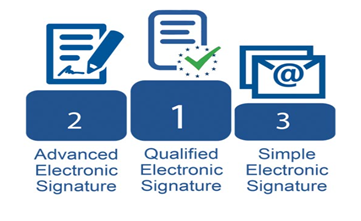
1. Simple Electronic Signature
A simple electronic signature is the most basic and broadest form of an e-signature. An example of a simple e-signature is a personal email. It is the responsibility of the receiver of the document to trust the signatures as no identity verification is required. Sometime a simple electronic signature may be considered legally binding. However, for many documents, higher qualifications/compliance will be required.
2. Advanced Electronic Signatures
An advanced electronic signature is the next step up from a simple e-signature and these require some form of identity verification. These solutions are usually offered as a platform and an example of advanced e-signatures would be Acrobat Sign offered by Adobe. Under the EU regulation on electronic Identification, Authentication and Trust Services (eIDAS) Advanced Electronic Signature (AdES) is considered legally binding. These types of signatures often suffice for the bulk of the signature requests. They come with an audit report which outlines the exact path the document took, noting IP addresses of who signed the document, email addresses of who approved/signed the document and the timing. These details can be checked and verified.
Adobe have made the process of implementing this technology seamless and easy for anyone to use and as easy as sending an email. (Check out this interactive demo here for Acrobat Sign)
3. Qualified Electronic Signature
The final type of electronic signature we will discuss today is a qualified electronic signature. These are similar to advanced electronic signature but require a higher level of identity verification. Qualified electronic signatures (QES) must have a certificate based on public keys that were issued with proper technological means. The identity of the signatory must have been identified by an audited entity. Essentially the identity of the signatory must have been confirmed by a qualified trust service provider which all governments of EU states must provided a list of. To get an idea of the process required to sign up for a qualified electronic signature check out this ‘How To’ video from TrustPro
In Ireland, the government have elected TrustPro to be the Qualified Trust Service Provider to supply Qualified Electronic Signatures and Micromail act as the only partner for TrustPro in Ireland.
https://www.gov.ie/en/publication/7cbde-trust-service-providers/
Qualified Electronic Signatures are considered the same as handwritten signatures:
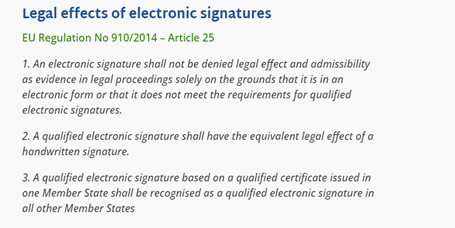
Source: eIDAS Regulations
As you can see the landscape for electronic signatures has a variety of options. To establish what solution is most suited to your use case please get in touch with us at info@micromail.ie
It’s not exactly perceptive to say the last year has been an unprecedented experience for most companies. Navigating a sudden transition to remote work led to challenges both expected and unexpected.
One of the biggest losses of the remote work transition has been the ease of communication and information flow that normally happens in an office setting. No longer can employees walk to one another’s desks to ask a question, go over something, or demonstrate exactly how a process is done.
Now, instead of swinging by a colleague’s desk, we’re forced to jump on a live video call or type out a long explanation of what’s being discussed. Neither is an efficient use of time, and both can be fairly exhausting when added to everything else workers already have on their plates.
A better way to communicate in the remote office
TechSmith Snagit helps remote employees and offices return to and even exceed the efficient communication that used to happen within the office. By capturing and sharing screenshots or short videos, employees can say more while typing and talking on video calls less.
Snagit makes it easy to quickly take a screenshot, make quick, simple edits like annotations or text, and send the image to a colleague. No need to write out a description or explanation, the words are all contained in the visual. When an image isn’t enough, a video can be recorded, with or without voice narration, and shared just as quickly.
Using images and video in this way makes it so employees can communicate like they’re in-person, without needing to be in-person or on a video call. If you’ve heard of “asynchronous communication,” this is it, and it’s a game changer for work.
Compounding time savings
A screenshot or video used once saves a nice chunk of time, but one of the best things about the visuals created with Snagit is they can easily be reused. When a question is asked multiple times, or others need to be explained a process or concept, the same visual used the first time can be shared once again.
Snagit has built-in features that make storing, organising, and accessing previously taken captures easy. That video created last week? It’s easy to find in the library. A screenshot showing a small change that needs to be made to a website? It’s right there in the tray for sharing with stakeholders.
The simple reality is that using images and videos when communicating about projects and work saves immense amounts of time. It makes the day easier for every employee.
To discuss how TechSmith can add value to your organisation talk to you regular Micromail account manager or email info@micromail.ie to organise a call.