Author: granitewordpress
I was fortunate to recently attend the Microsoft Ignite The Tour in London. It’s just amazing at the effort and commitment Microsoft makes to improve its customers’ business. The hospitality was outstanding and there is little wonder why Microsoft is such a successful company. The event was well attended, and the sessions offered in-depth insights and best practice adoption paths. I found myself struggling to decide on what sessions to attend. The event hosted several Microsoft partner product offerings which is interesting to see some of the technologies that sit around the Microsoft 365 and Azure stack. Everything from security and identity management through to migration and user management.
It was great to meet up with some familiar faces over coffee, share some success stories and catch up on what everyone is doing with these incredible tools Microsoft has developed. I thought I would share some insights about these I picked up over the two days in a few of the sessions I attended.
Patrick Chanezon walked us through Azure security fundamentals. Using the Azure Security Center tools we can ensure best practice when building and configuring resources, how we can leverage Azure Sentinel to actively respond to suspicious activity and threats. How to connect securely to your Azure Resources using the New Azure Bastion. All this helping to assess and improve your security posture with Secure Score.
Role-based access control in Microsoft 365 by Alice Appleton focused on the role-based access control or RBAC. In this session, we learnt about how to centrally manage, granular role-based access control in Microsoft 365. Highlighting workload-specific admin roles and global reader role. This allows you to improve your administrators’ access security and reduce the number of Global administrators currently in your estate.
In April Edwards session on Data Storage in Azure, she introduced the various storage options available on Azure, from blob to SQL databases. We learnt about Azure Cosmos DB as an alternative to traditional Blob or SQL storage. I believe Microsoft uses Cosmos DB to host the Xbox platform. So, you can imagine the scale and power needed for such a mammoth system like Xbox. April demonstrated how within an Azure storage account you can quickly and easily deploy a static web site with very little resources. This is great for when the Marketing department comes to you at the last minute and needs a website for this or that event.
Our very own Kevin Greene (Ergo Azure MVP) session on Azure Monitor offered a brilliantly in-depth illustration of how you can drill into your resources and application whether they’re hosted in the cloud or on-premises. This is incredible given you can have a consistent monitoring tool regardless of where it is. One of the highlights of the session was Application Insights that monitor the availability, performance, and usage of your applications in real-time and lets you diagnose errors and performance issues proactively.
Overall there was a lot to cover in just 2 days. It wasn’t possible to attend all the sessions. Thankfully Microsoft has made some of the sessions available on demand. I encourage you to follow the link and to get some of them in while you can. I totally enjoyed the event and would like to thank Microsoft for hosting the Ignite tour in London.

Onder Deger, Kevin Greene from Ergo and Stewart Kennedy, Micromail all pictured above
In a recent blog, I discussed the End of Support for Windows 7 and what to consider when planning your migration path. Keeping the reading light, I chose not to mention that Office 2010 is facing the same fate on the 13th of October 2020. Thankfully the path forward is a bit less complicated and Microsoft offers services like Desktop App Assure which will help your organisation with any compatibility issues when following the recommended upgrade path.
What is the Microsoft recommended path? Move to Office 365 or Microsoft 365 which includes both Windows 10 and Office 365. So the question is, why not Office 2019?
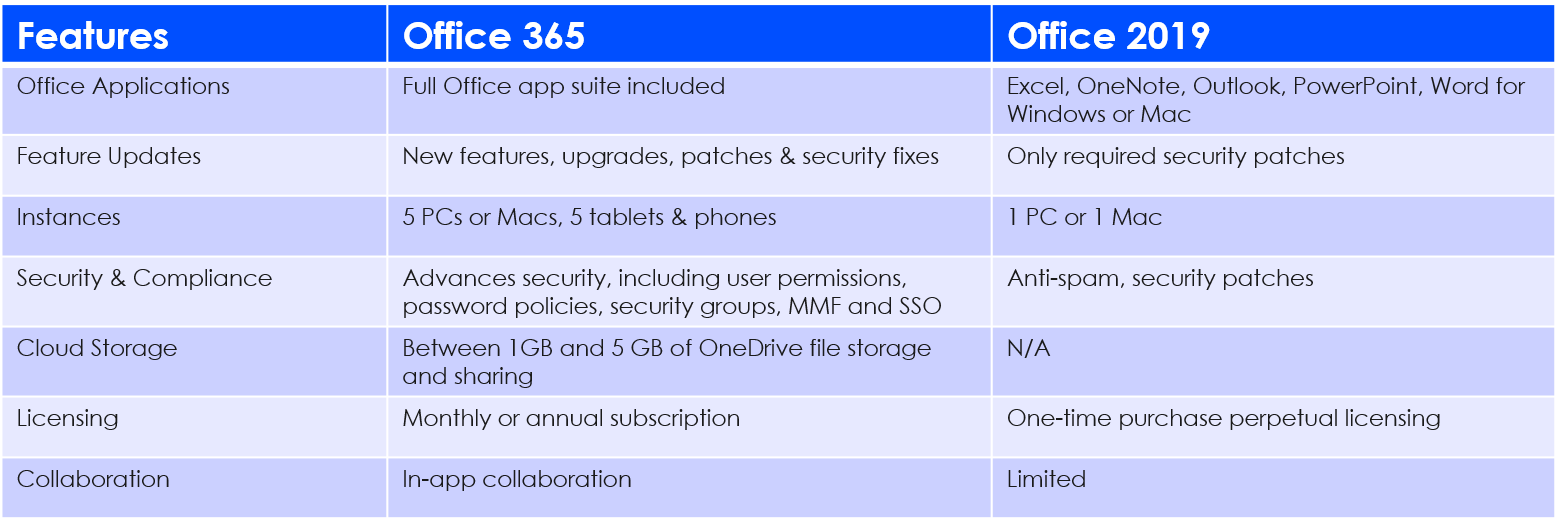
It’s a simple case of more for less. I am going to try and break it down for you without getting too technical. If we look at Office 365 and Office 2019 they both come with the latest Office productivity suite, however, Office 365 is powered by the Microsoft Cloud, which means it has more features with build in AI and better security. Office 2019 is just a once off install which is an on-device only digital workplace.
Office 365 is a monthly or annual subscription – the only difference you need to understand is the way it’s delivered to devices and updated.
Office 365 allows you to have up to 5 simultaneous installations for each user, which means you can install the full Office experience on up to 5 PCs, Macs, and or smart devices. Unlike Office 2019 which is a standalone non-subscription version locked to the device.
Office 2019 includes features found in Office 365, but it’s not part of Office 365 product offering. It’s the traditional Office installation which we are all familiar with and more comparable to Office 2010. The fundament difference is Office 365 is a cloud service that seamlessly connects and includes Exchange Online, Sharepoint Online, Microsoft Teams/Skype – making it possible to work in any location, across multiple devices.
Check out the Twins Challenge that illustrates some of the key differences in the productivity suite of Office 365 ProPlus and Office 2019 https://www.microsoft.com/en-us/microsoft-365/blog/2019/02/06/the-twins-challenge-office-365-crushes-office-2019/
Here a short table comparing the two:
Now for the important part – What does this mean for IT?
Active Directory integration: Office 365 user permissions can be quickly managed and synchronized with Azure Active Directory (AAD), enabling single-sign-on (SSO) of Multi-Factor Authentication which provides a high level of security and easier access.
Click-to-Run: Office 365 has a streamlined installation process that makes it easier and faster for users to get set up, and you can also let local admin-permitted users install manually through a web-based portal.
File-share, Storage and Backup: Microsoft Sharepoint and OneDrive offer users a workspace to store, access, co-author, files from anywhere. This will lighten the workload on your local network storage. External sharing is also made easy and even allows you to protect files regardless of who it is shared with outside your organization.
Multiple Deployment method: You can deploy Office 365 to your users in multiple ways and that best suit your current state of digital transformation – with the Office Deployment Tool (ODT), Intune, Content Delivery Network (CDN) or System Center Configuration Manager (SCCM) you can reach both on-premise and cloud deployments.
Updates: Office 365 is one of the most feature-rich and secure versions available. Feature updates are scheduled automatic by default and can be changed to suit your organisation policy. This will then allow testing or manage updates using SCCM. You can also control how frequently users get updates for Office apps; semi-annual or monthly.
Group Policy: With Office 365 settings can be managed through the same Group Policy settings your business uses with other versions of Office currently installed on your network.
Workplace mobility: Powered by the Microsoft Cloud, you have more options when it comes to which work devices are granted access to which application. Instead of Office being locked to a desktop computer, it can be licensed to a user’s work or private laptop or tablet, allowing them to view and edit documents on-the-go securely.
Today’s productivity landscape has evolved into an always on, always available digital workspace. Employees want the ability to respond, collaborate and communicate on any device, at anytime from anywhere.
It reminds me of the story about Henry Ford, who made a very brave decision to change the productivity landscape by reducing the work week to improve production. Everyone thought he had gone mad and it would cost him dearly. Well, it worked. This is true for today’s digital workspace and the flexibility Office 365 can bring to your workforce. Through Office 365 deployment, you will see increased productivity and improved morale by empowering your staff through a more flexible work landscape.
Want to know more? Talk to us here to find out how you can transform your workplace with Office 365.
A decade down the road and it’s time to say goodbye to Windows 7. I know what you’re thinking – we tried Windows 8.1 back in 2012. It didn’t go well. But, looking ahead, Microsoft have given us a more secure, reliable, and compatible OS than ever before; Windows 10.
Before we get started, you should know this blog has a dual purpose.
Apart from highlighting the obvious improvements and convenience of Windows 10 compared to Windows 7, January 14th 2020 has been named as the date for End of Support (EOS) for Windows 7. After this, Microsoft will no longer provide security updates or support for PCs running Windows 7. You can, however, continue to use Windows 7, but once support ends, your PC will become more vulnerable to cyber-attacks and threats. If you’re also thinking that not upgrading will save you money, think again. The cost of recovering data from a hacked system, and then having to upgrade anyway, will cost you a lot more in the long run.

But – it’s not all doom and gloom, we can keep the good times rolling by planning the process today.
So, what are your options?
For users of Windows 7 Professional and Windows 7 Enterprise, you can purchase Extended Security Updates through January 2023. For more in-depth details about Windows 7 Extended Security Updates, you can download the Microsoft End of Support FAQ.
It’s also advisable to look to upgrade compatible Windows 7 PCs based on these requirements to a full Windows 10 OS. This can be done in two ways; purchase the OS license outright, or simply upgrade your Office 365 plan to Microsoft 365 Business or Microsoft 365 Enterprise. The Microsoft 365 plans already include Windows 10 and offer additional security features through EM&S, such as advanced threat protection and conditional access at no additional cost.
Another exciting option is to look at moving to the cloud with Microsoft Windows Virtual Desktop(WVD) services in Azure. This is a great option if your company runs legacy applications and need to continue to support Windows 7 as you move to Windows 10. WVD will enable your business to virtualise Windows 7 desktops with free Extended Security Updates (ESU) until January 2023. This support provides a comprehensive virtualisation solution for Windows 7 alongside your Windows 10 and Windows Server desktops and apps. These Virtual VM can either run Windows 10 Enterprise multi-session or Windows 10 single-session making it suitable for both power users and field staff.
Or you could simply take advantage of the latest hardware capabilities, and move your users to a new PC with Windows 10.
Sound complicated? With a partner, it doesn’t have to be.
Any which way you are considering, my advice is to engage your Licensing Partner and/or Software Asset Management (SAM) partner now! If you don’t already have one, you can talk to us. Whether you are considering new hardware, an OS migration, cloud virtualising or a combination the sooner you start preparing the less likely you will be rushed to decide, or worse, not to decide. What a partner can provide you with is an accurate assessment of your estate, costs and your effective license position required for compliance. From there, you can outline the scope and understand what each potential option will cost and how long it will take to deploy. Be prepared and get ready – with less than a year to go there is no time to waste.
Need to start your Windows 10 upgrade? Talk to us and tell us more.
It’s incredible to witness the pace of digital transformation through cloud adoption. As with any pioneering journey, there is always the risks of encountering threats that can end your journey. So, it’s vital you adopt the right security and compliance strategy to mitigate these risks. The question is how can we do this effectively and with minimal disruption to our business? Choosing the right technology partner and toolset are just a few ways to a secure successful digital transformation.
Microsoft and its transformation of Office to Office 365 and now Microsoft 365 has fundamentally changed that way we work. Being able to access our corporate information anywhere and at any time has rapidly made us better-informed decision makers.
However, this dynamic way of processing data presents risks in terms of data breach and compliance. Just last year the European Union introduced the General Data Protection Regulation (GDPR) to address these risks. GDPR requires companies to better secure information in motion, at rest and in use under strict compliance conditions.
In order to meet these increased compliance requirements, Microsoft has introduced two new Microsoft 365 security and compliance toolsets that will be available for purchase on February 1, 2019.
Identity & Threat Protection—Brings together security value from across the Office 365, Windows 10, and EMS offers in a single bundle. It includes best of breed for advanced threat protection services including Microsoft Threat Protection (Azure Advanced Threat Protection (ATP), Windows Defender ATP, and Office 365 ATP including Threat Intelligence), as well as Microsoft Cloud App Security and Azure Active Directory. This offer will be available for around €10.10 per user per month.
Information Protection & Compliance—This offering brings together Office 365 Advanced Compliance and Azure Information Protection. It’s built to help compliance and IT teams perform ongoing risk assessments across Microsoft Cloud services using AI. It automatically protects and governs sensitive data, and efficiently responds to regulatory requests leveraging intelligence. This offer will be available for around €8.40 per user per month.
Identity & Threat Protection and Information Protection & Compliance offerings are designed to provide you with simple, secure and compliant workloads. Micromail is here to ensure you get there. Together with our parent company Ergo, we can help you plan, implement and evaluate your security and compliance deployment.