Tag: Adobe
Universities and higher education institutions rely heavily on paper documentation, and that comes at a high price for their finances, reputation, security and carbon footprint.
From employee onboarding to student enrolment and financial transactions, the form filling that goes on behind the scenes of every educational institution is extensive.
Thankfully, with Adobe Acrobat Sign, institutions of higher education can effectively address the paperwork challenges they face today and in the future. By offering electronic signatures, schools and universities can automate their paper-based documentation systems and provide students with a digital documentation experience. You can view and legally sign documents from any device, anywhere, anytime. No accounts or logins are required.
Adobe Acrobat Sign is a cloud-based service made to cater to a host of industries, including educational institutions. It is simple, efficient, and legally binding. Because Adobe Acrobat Sign uses encryption, it is more secure than traditional methods. Using it is also easier than using traditional methods, and that is why Adobe Acrobat Sign is the preferred supplier of digital document solutions to some of the UK and Ireland’s most prestigious educational institutions.
In this post, we explain how Adobe Acrobat Sign can help universities to increase their efficiency on both an academic and administrative level.

Most Popular Use Cases of Electronic Signatures in Education
Universities and other educational centres can implement Adobe Acrobat Sign for a number of use cases, including the following:
- Registration of new students
- Signing of academic research documents
- Grades reports
- Scholarship applications
- Student loan documents
- Financial aid paperwork
- Staff employment contracts
- Contracts
- Offer letters
- HR documents
- Course enrolments
- Permission slips
- Leave applications
- Progress reports
- Timesheets
Benefits of Implementing Adobe Acrobat Sign in Educational Institutions
Educational institutions that employ digital methods of documentation, including electronic signatures, stand to benefit greatly from these solutions.
Here are some of the advantages of leveraging Adobe Acrobat Sign in higher education institutions:
Saves Time and Resources
Processing physical documents requires a lot of time, effort, and money. Electronic signatures can help reduce the costs associated with printing documents. There will also be a decrease in stationery costs for paper and ink, as well as printing equipment such as printers and scanners. Switching to a paperless process also leads to a lot of indirect savings from not having to use printers and fax machines.
Furthermore, dealing with mountains of paperwork can be a time-consuming task, especially in the education industry. Printing, signing, transferring, and storing documents comes with a lot of human effort. Universities can automate their processes by implementing electronic signature solutions like Adobe Acrobat Sign. Not only does it save human efforts and monetary costs, but it ensures that work is done faster and without the documents being at risk of being tampered with.
It is Trusted and Compliant
Unlike paper-based signatures, electronic signatures are supported with many layers of security processes that make them difficult to forge. In addition to providing enhanced security, electronic signatures also protect student information in databases against theft. An important benefit of electronic signatures is that they provide audit trails that help in monitoring all the crucial details of a signature.
The use of electronic signatures also reduces the chances of tampering or forgery when a document is posted to be signed offline. In order to protect confidential and sensitive documents, universities and other educational institutions can implement a verification system of electronic signatures through biometric data.
It is Environmentally Friendly
Consider the carbon footprint associated with obtaining a signature. Using electronic signatures eliminates the need to travel. By simply using your computer or mobile phone, you can sign from anywhere in the world. In addition to eliminating the need to travel for placing handwritten signatures, electronic signing significantly contributes to achieving a paperless office. It leads to decreased usage of paper, and lowers your institution’s CO2 emissions, helping to preserve our planet.
Improves Inter-Departmental Efficiency
Projects that go through multiple departments typically require authorisation from several parties. This includes everything from interdepartmental documents to internal forms. Instead of dealing with printers, scanners, and fax machines to add signatures to documents, you can simply use Adobe Acrobat Sign. The use of electronic signatures has become a standard practice in many educational departments, including those of administration, finance, operations, and other internal departments.
Protects the Brand Image of the Institution
The majority of students, parents, and teachers/professors prefer to do almost everything digitally today. Students prefer learning institutions that enable them to interact digitally and are unconvinced by those that do not. Using an innovative technology that is environmentally friendly and keeps your operations digital will ensure your institute is seen as progressive.
Conclusion
The rapid adoption of digital technologies, like Adobe Acrobat Sign, that speed up paper-based processes and improve the student and staff experience, should be part of your strategy for success. Any educational institution that deems itself as progressive shouldn’t be left behind in implementing electronic signatures in its operations.
Adobe Acrobat Sign is the future of document signing, and it is revolutionising the way educational institutions do business. Available to purchase via Micromail through the Adobe Value Incentive Plan (VIP) program, Adobe Acrobat Sign can save schools and universities both time and money by automating the presentation and signing of documents.
If you are ready to discover everything that’s possible with Adobe Acrobat Sign, contact Micromail here.
Adobe have recently enabled a new feature, which gives Creative Cloud ‘VIP’ users the ability to request access to new software.
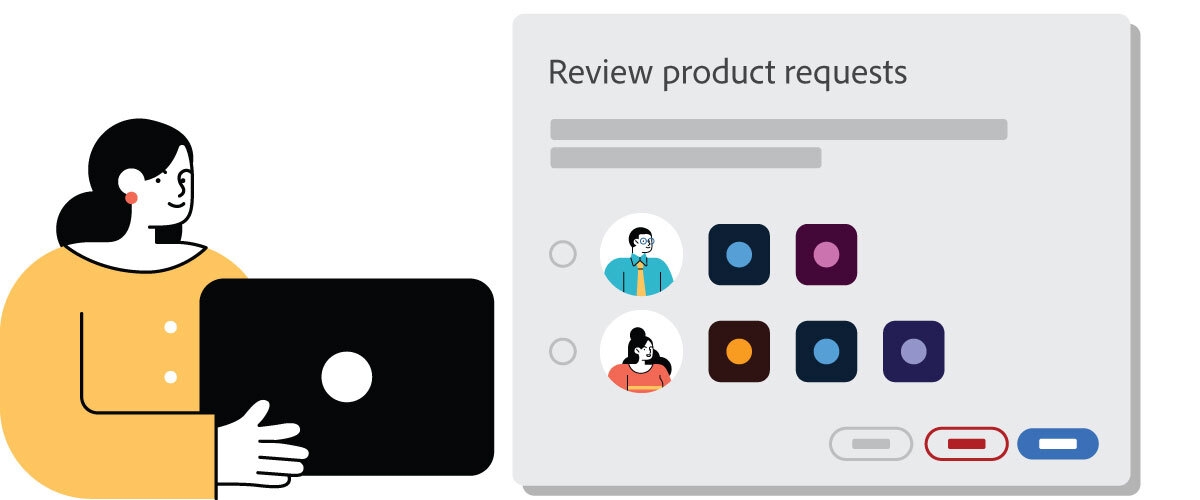
Product requests allow users in your organisation to request access to Adobe products and services. Users can also request products and services that your organization has not yet purchased. System Administrators can then choose to approve or deny these requests. By default, product requests are enabled for all eligible organizations in the Admin Console. The feature can be disabled by a System Administrator at any time.
Now as a System Administrator, instead of manually assigning products and services to users, you can have users request access to the products they need, and then choose to approve or deny the request.
Currently, users can request access to Adobe apps and services from the following surfaces:
Creative Cloud desktop app
Creative Cloud on the web (desktop only)
Adobe will continue to add more applications to this list.
For products that don’t support in-app requests and are not available on the Creative Cloud desktop app or Creative Cloud on the web (like Adobe Sign and Adobe Analytics), people can use automatic assignment rules to generate a Product Access URL. Users can follow this URL to get immediate access to a specific product. Automatic assignment rules can also allow selected users to be granted immediate access to a product when they send a request.
The fact that Adobe have enabled this new feature by default, has led to a lot of confused and annoyed system admins. Further your organisation may have engaged a third party to manage onboarding and the associated commercials, and this new feature may upset those operational standards.
Product requests are automatically enabled for all organizations that use Business profiles and storage. A System Administrator can choose to disable product requests at any time by selecting Edit Settings on the Product request page.
Our advice is to turn this feature off, before assessing its suitability. You can reach out to us here to discuss your options around this and other features of the Adobe Admin Console.

Learn more about the end-user request access experience.
Electronic signatures such as Adobe Acrobat Sign came under the spotlight and the forefront of technology in 2020 as a result of Covid, the outcome of employees working from home. Signing everything electronically, contracts, legal documents and more could no longer be done in person, so organisations looked to digital signing. This new approach also focused attention on companies Digital Transformation and Sustainability journeys.
E-signature Basics
There are two main kinds of signatures: wet signatures and e-signatures. Here’s a closer look at how they differ.
- Wet signatures are physical signatures you make on paper with a pen. These signatures are a representation of the signer’s identity and acknowledgment of the document they’re signing. A person might physically sign the document and send it back to the recipient in the mail or sign it in the presence of certain individuals.
When you sign a physical document, the recipient must trust that you’re the right person. While the recipient can verify the signer’s identity when they provide them with documentation such as a driver’s license or Social Security card, it’s tricky to do so unless the signer and recipient are in the same room. Furthermore, signers must trust that signatures aren’t going to be forged.
- An electronic signature serves the same purpose as a wet signature – it represents the signer’s identity and acknowledgment of the document they’re signing. This kind of signing happens online and is legally binding in most cases, just like a wet signature. An example would be signing an apartment lease through the property management website’s portal.
- This kind of signature is much easier to verify. An electronic signature is linked to the signer’s name, computer, email address, and IP address. This information makes it simple for recipients to track who signed what and when. If a bad actor attempts to impersonate you, it won’t take long to follow the digital trail and find out who it was.
An important point to make, is that many people use the terms “electronic signature” and “digital signature” interchangeably. These signatures aren’t the same.
“Digital signatures are a more secure version of electronic signing that involves a digital certificate and public key infrastructure (PKI). These kinds of signatures are an essential part of certain online security processes, but electronic signatures are what you use when signing documents online, not digital signatures.”
Electronic signatures can be more secure than paper signatures. Electronic signatures have many layers of security and authentication built in, along with legal proof of transaction.
Unlike wet signatures, e-signatures also come with an electronic record that serves as an audit trail and proof of the transaction. The audit trail includes the history of actions taken with the document, including the details of when it was opened, viewed and signed. If one of the signers disputes their signature, or if there’s any question about the transaction, an audit trail is available to all participants which can resolve any objections.
Detailed certificates of completion are another feature, this can include specific details about each signer on the document, including the consumer disclosure indicating the signer agreed to use e-signature, the signature image, key event timestamps and other identifying information.
Th use of tamper-evident seal is also used once the signing process is complete, all documents are digitally sealed using Public Key Infrastructure (PKI), an industry-standard technology. This seal indicates the electronic signature is valid and that the document hasn’t been tampered with or altered since the date of signing.
The right e-signature solution should be able to provide all the above. In addition, they should have certifications from neutral third parties that prove their claims. The ISO 27001:2013 certification is the highest level of global security assurance available.
Types of documents that can be signed by an e-signature
- Any business agreement that can be signed with a pen and paper can be an e-signature document:
- Purchase agreements
- HR employment contracts and offer letters
- Legal documents
- Rental agreements
- Accounting documents such as Profit and loss statements
- Tax forms
- Sales Proposals
Adobe Acrobat Sign is a market leader in the e-signature space and uses Public Key Infrastructure (PKI). PKI uses a public and private key to ensure that the signature provided is authentic. Much like an in-person signature where you may have to match one on file, digital signature keys require key matches to verify the signature.
There are numerous laws surrounding digital signatures and their legality and have been since 1999. Regulations such as the Electronic Identification and Trust Services (eIDAS) regulation, was recently adopted in the European Union. Compliance is stringent to prevent fraudulent attacks but nevertheless hackers have found ways round.
One of the weakest links in cybersecurity is human input. Providing your employees with the correct training to flag any potential scams is a simple first step. Having a process to report scams should be in place. As attacks get more sophisticated, regular and updated training and awareness among staff is key. Alongside, ensuring all computers are up to date, with the correct security patches is imperative.
Here’s more information about what you need to know about e-signatures and cybersecurity.
What Are the Risks of Electronic Signatures?
Before there was a digital alternative, pen-and-paper signatures were the most secure option. Ideally you would have a witness to the signing to verify the signer’s identity. If the authenticity of the signature was ever in doubt, a signature forensics expert could verify it. Additionally, the paper copy could be stored for an indefinite amount of time.

If you have a home office you know the risks of paper signatures: children, dogs, spilled coffee, unruly filing cabinets etc. It can be risky to sign paper documents even in the comfort of your own home. And, of course, paper signatures are vulnerable to fire, flood and other natural disasters. You can solve that problem by making copies, but that introduces possible tampering. Or you could scan all the documents into a computer system, but then they’re just e-signatures without the additional security an e-signature platform provides.
While e-signatures such as Adobe Acrobat Sign are often more secure than wet signatures, businesses can still encounter issues when they use them. The security of an electronic signature lies in your hands. If your organization mishandles the data associated with the e-signatures you have on file, you can experience many problems, including:
- Intellectual property loss: Because customers and clients trust you with their data, it’s crucial to keep it safe. This factor is important for reputation and legal reasons. If you fail to properly manage the electronic signatures you receive, you could experience repercussions from the public and the law.
- Decreased productivity and flow: When an employee accidentally deletes or misplaces data such as e-signatures, it affects your entire business’s productivity and flow. Once that happens, you’ll have to set aside time to recover what was lost and communicate what happened to the relevant individuals.
- Financial loss: In some cases, data-loss issues translate to financial problems. When customers and clients learn about what happened, they may choose to take their business elsewhere. As a result, you miss out on sales.
Security Benefits of Electronic Signatures
The main advantage of electronic signatures such as Adobe Acrobat Sign is that they’re more secure than wet signatures. These signatures provide increased authenticity and make it less likely that someone will attempt to forge a signature. Even when that happens, it’s not as much of an issue as it’d be with a wet signature, as the forgery is typically easy to track.
There are several technological layers to electronic signatures. At a minimum, your signature will be linked to your unique device and signing certificate password. For increased security, you can require two-factor authentication (2FA) and other verification processes. The resulting digital trail gives signers greater peace of mind and recipients know what to do to verify signers’ identities. When businesses heavily rely on signatures for various documents, e-signatures provide a secure and accessible way for customers and clients to approve documents.

What to Consider Before Using Adobe Acrobat Sign
Like any new feature you introduce to your organization, you’ll want to weigh the pros and cons before you become fully invested. In general, e-signatures have many advantages, so long as you have a plan in place to manage and process them properly. Ultimately, know that in most cases, your business can benefit from implementing Adobe Acrobat Sign. As a result, your customers and clients will have a safe and easy way to sign a variety of documents, whether coffee shop receipts or non-disclosure agreements.
Investing in a secure platform such as Adobe Acrobat Sign will boost your chances of success. When conducting your research, be sure to compare e-signature options so you know which ones are the most secure, meet your needs, and match your budget. After you choose a platform, make sure your staff members know how to use it properly. If you have an information technology (IT) department, have them guide the training for relevant employees. This way, they’ll know how to correctly manage the data, reducing the risk of errors.
Electronic Signatures Can Be an Effective Alternative
Many organisations are moving away from wet signatures and implementing e-signature software such as Adobe Acrobat Sign in their place of work. This kind of approach can make it easier for companies to collect signatures for a variety of applications without having to worry about paper and pens. When you have the right approach in place, e-signatures can be an effective solution.
For more information on Adobe Acrobat Sign or anything Adobe email adobe@micromail.ie
In recent years we have seen the growth of a hybrid approach to the workplace and a massive digital transformation. Every department has a use case for collecting e-signatures and as organizations begin to adopt this technology and implement it to replace legacy traditional processes, it is good to know the different type of e-signatures. In this post we will discuss three types of e-signatures. Firstly, we should look at what an e-signature is. An e-signature is a method by which you attach identity to a document. There are three separate methods that can be used and in recent years we have seen a massive growth across all sectors in a demand for these solutions.
Use Cases
Electronic signatures can be used nearly anywhere. However, there are particularly common use cases, including:
- Sales contracts
- Purchase orders
- Vendor contracts
- Real estate contracts
- IP licensing agreements
- Legal agreements
- Non-disclosure agreements
- Employee contracts
Confusion often arises around the types of electronic signatures and the phrase “digital signature” is often used interchangeably with e-signature but are in fact not the same thing. Online signatures, electronic signatures or e-signatures refer broadly to any electronic process that indicates acceptance of an agreement or a record. The term “digital signature” is frequently used to refer to a certificate-based digital signature, which is a specific type of e-signature. Digital signatures use certificate-based digital IDs from trust service providers (TSPs) to verify signer identity and demonstrate proof of signing by binding each signature to the document with cryptography. Let’s take a look at the different types of e-signatures now:
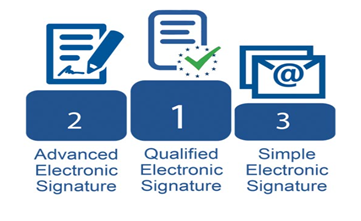
1. Simple Electronic Signature
A simple electronic signature is the most basic and broadest form of an e-signature. An example of a simple e-signature is a personal email. It is the responsibility of the receiver of the document to trust the signatures as no identity verification is required. Sometime a simple electronic signature may be considered legally binding. However, for many documents, higher qualifications/compliance will be required.
2. Advanced Electronic Signatures
An advanced electronic signature is the next step up from a simple e-signature and these require some form of identity verification. These solutions are usually offered as a platform and an example of advanced e-signatures would be Acrobat Sign offered by Adobe. Under the EU regulation on electronic Identification, Authentication and Trust Services (eIDAS) Advanced Electronic Signature (AdES) is considered legally binding. These types of signatures often suffice for the bulk of the signature requests. They come with an audit report which outlines the exact path the document took, noting IP addresses of who signed the document, email addresses of who approved/signed the document and the timing. These details can be checked and verified.
Adobe have made the process of implementing this technology seamless and easy for anyone to use and as easy as sending an email. (Check out this interactive demo here for Acrobat Sign)
3. Qualified Electronic Signature
The final type of electronic signature we will discuss today is a qualified electronic signature. These are similar to advanced electronic signature but require a higher level of identity verification. Qualified electronic signatures (QES) must have a certificate based on public keys that were issued with proper technological means. The identity of the signatory must have been identified by an audited entity. Essentially the identity of the signatory must have been confirmed by a qualified trust service provider which all governments of EU states must provided a list of. To get an idea of the process required to sign up for a qualified electronic signature check out this ‘How To’ video from TrustPro
In Ireland, the government have elected TrustPro to be the Qualified Trust Service Provider to supply Qualified Electronic Signatures and Micromail act as the only partner for TrustPro in Ireland.
https://www.gov.ie/en/publication/7cbde-trust-service-providers/
Qualified Electronic Signatures are considered the same as handwritten signatures:
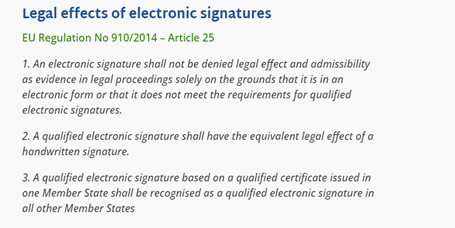
Source: eIDAS Regulations
As you can see the landscape for electronic signatures has a variety of options. To establish what solution is most suited to your use case please get in touch with us at info@micromail.ie