Tag: Adobe

The End of Acrobat Perpetual Upgrade Plan
In the era of subscription-based licensing, we have seen more and more software vendors make the move to a per user, per month/per year model and Adobe are no different. Most of their creative tools can only be purchased in this way but the powerful PDF tool Acrobat has continued to be available as a perpetual license. When purchasing a perpetual license of Acrobat, you would have been given the opportunity to also purchase ‘Upgrade Plan’. Active Upgrade Plan meant users got access to any new perpetual version of the product that was released. However, Adobe have recently announced that Acrobat Upgrade Plan will no longer be available as Adobe have no current plans for a new version of Acrobat Perpetual. This announcement is no surprise as it brings us one step closer to a pure subscription model only for Acrobat.
In today’s world, the subscription model makes more sense for a number of reasons:
- It gives the user access to the latest version of the product with features above and beyond what had been offered in the perpetual model.
- Downloading the product can be done easily by logging into an individual account, using an Adobe ID or federated ID.
- End users also enjoy 2GB cloud storage that is accessed by their Document Cloud account
- It reduces compliance risk for the company
- It gives your company a chance to easily standardise
- User administration is simplified with Adobe’s management console
What does this mean for me?
If you have purchased Acrobat Professional or Acrobat Standard in the past in perpetuity, your rights to this license have not changed. You can continue to use the product in the version that you purchased it. Today’s current version of Acrobat pertual, and likely to be last version, is Acrobat 2020. If you currently have an active Upgrade Plan you may be eligible for a migration promo to move to Acrobat DC (subscription based).
To discuss more on Adobe Acrobat please talk to your regular Micromail account manager or email our dedicated Adobe team on adobe@micromail.ie to organise a call.

Since 2017, Microsoft and Adobe have been working together to unite data, content, and processes for their customers. The strength and diversity of their global partner ecosystem is now more important than ever, as growing customer expectations for seamless customer experience have raised the bar on collaboration, integration and time to market.
In 2021, we are seeing a new wave of innovations to improve collaboration and business agility between the two, across all touchpoints.
In Micromail, we find ourselves in the unique position to be both Ireland’s leading Microsoft Licensing Solution Provider (LSP) and Ireland’s only Worldwide enabled Adobe Platinum Reseller with experts in both vendors. We would like to talk about some of these integrations so that you can get the most out of your investments.
Acrobat + Teams
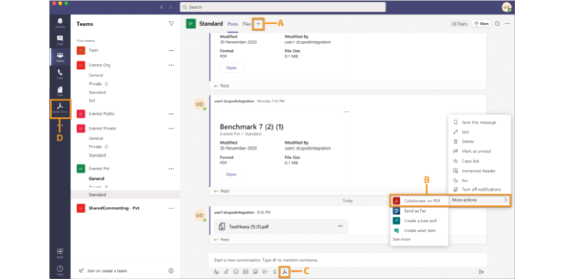
Adobe Acrobat integration with Microsoft Teams allows you to effectively collaborate in real-time on PDF documents with other team members. Simply download the Acrobat app from your Teams app store and sign in to your Acrobat account. You can use the Adobe Acrobat app’s commenting features to write notes to yourself as you view or read documents. Or use the annotation tools like Insert Sticky Note, Highlight Text, or Draw markups on the PDF to share with your teammates.
Acrobat + Power Automate
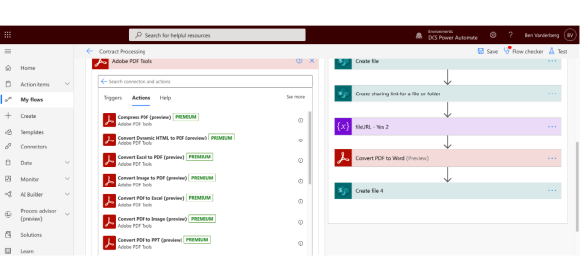
The Adobe PDF Tools Power Automate connector brings high-fidelity PDF manipulation capabilities to perform document actions such as create, export, combine, compress and protect PDF files. This new service provides additional flexibility for users who want to perform tasks like converting Word documents using optical character recognition (OCR), or securing, modifying, and exporting PDF documents as part of a custom document workflow – all within Power Automate.
Adobe and Azure SSO
Authenticate your users quickly using Open ID Connect (OIDC). You can also add Microsoft Azure AD Sync (Azure Sync) to the directories set up with Microsoft Azure to automate user management. Azure Sync automates the user management for your Admin Console directory. You can easily add Azure Sync to any federated directory in the Admin Console regardless of its identity provider (IdP). To use Azure Sync, you must have your organization’s users and groups data stored in the Microsoft Azure Active Directory (Azure AD).
Adobe Sign and….well, everything

Adobe Sign is Microsoft’s eSignature solution of choice, and comes with out of the box integration with the Office stack allowing users to send documents for signature directly from within Microsoft Word, Outlook, and PowerPoint. Adobe Sign is also the preferred e-signature solution across the Microsoft enterprise portfolio, including SharePoint, Dynamics,Teams, Flow, and PowerApps. Adobe Sign also allows users to Embed e-signature processes into your custom business applications and update data in back-end systems automatically with comprehensive APIs.
Adobe Sign + Teams
Getting things approved is part of almost evey workflow. And because more than 100 million users collaborate with co-workers in Teams, it makes sense to enable Adobe Sign e-Signature workflows right inside the Teams Approval interface. Start an approval flow with an e-signature in the same place you send a chat, in a channel conversation or from the Approvals app itself. It’s that easy!
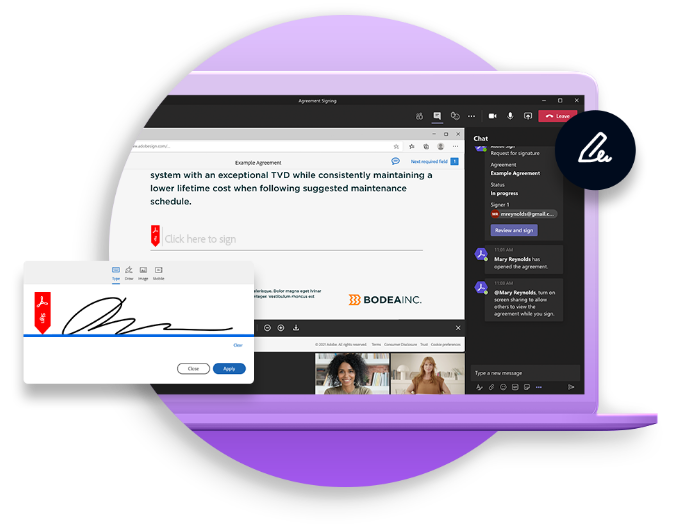
Most eSignature solutions deliver documents via email or weblink with little instruction or description. But some documents require a live conversation to ensure the signer feels comfortable. Other documents may legally require a live signing experience. Live Sign in Adobe Sign for Teams revolutionises the signing experience for both senders and signers by making a secure face-to-face signing a reality, without the need for anyone to travel. Senders can walk recipents through any document or agreement during a Teams video meeting. They can explain each page, answer questions, check for understanding and even read natural visual clues in real time. And recipents can then sign the document live durin the Teams meeting with legally binding e-Signatures.
Adobe Sign + Dynamics
Adobe Sign works natively with Microsoft Dynamics 365 so you can integrate it into your current Dynamics 365 document process with no coding required, and your staff can manage their entire eSignature workflow without ever leaving Dynamics 365. Documents can be sent to multiple recipents in any order that enables two or more recipients to receive the document simultaneously within a defined approval sequence. Your customers can sign documents fron any device, wherever they are.
Adobe Sign + Sharepoint
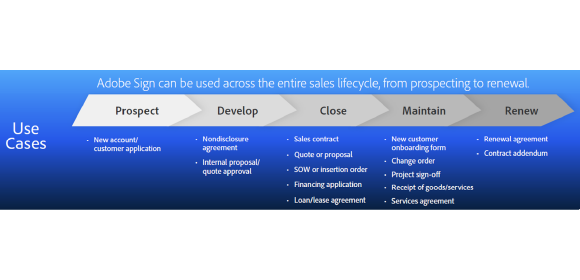
It is easy to set up Adobe Sign on your Sharepoint environment and from there, create clever workflows to speed up business processes. Take a look at the below example to see what Sign can do within Sharepoint.
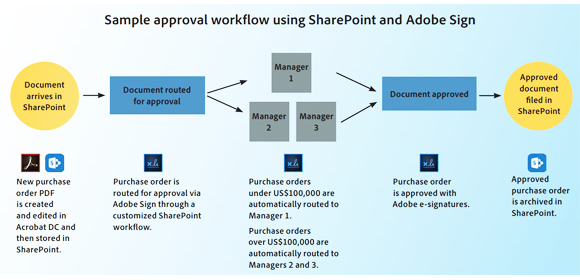
Further, you can create a folder within Sharepoint that collects all signed documents across the organisiation.
Adobe Sign + Power Automate
The Adobe Sign Power Automate connector provides a set of event triggers and actions that automatically start a signature process, kick off tasks after an agreement is signed, keep track of the signature status using notification templates and store signed agreement in your Microsoft environment and other applications. Many complex workflows require a large number of recipients, form fields and documents. The Adobe Power Automate connector includes a ‘support array’ feature that allows users to create robust workflows with Adobe Sign that contain dynamic form fields, recipients and documents in an intuitive and seamless way. Adobe Sign templates can be accessed from the Power Automate home page.
To discuss more on Adobe and Microsoft integrations please talk to your regular Micromail account manager or email our dedicated Adobe team on adobe@micromail.ie to organise a call.
We are pleased to announce that Micromail has become an Adobe Velocity Partner. This prestigious accolade is in addition to our Adobe Platinum Reseller Status and Adobe Elite Education Partner Status.
The Adobe Velocity Partner Program allows us to better support our customers to digitise workflows and enhance customer experience. In selecting Micromail as a Velocity Partner, Adobe recognised our commitment to building the right skills to support our customers and in developing best-in-class solutions that support eSignature workflows. Micromail now have 3 certified ‘Sign Admin Onboarders’, helping you to bring your e-signature business case to fruition quicker and in the most cost-effective manner.
Micromail will continue to work parallel to Adobe and deliver continued customer success.
Adobe Sign
Adobe Sign, the cloud based e-signature solution, allows users to send, sign, manage and store documents with trusted electronic signatures. With Adobe Sign, recipients can sign on the dotted line using a browser or mobile device and send or sign documents anytime, anywhere.
Adobe Sign is now available to purchase via Micromail through the Adobe Value Incentive Plan (VIP) program, enabling you to manage and align purchases across the Adobe product stack, on a single console.
Email our dedicated Adobe Team at adobe@micromail.ie or your regular Micromail contact.

I am very excited to announce that Micromail has been accepted into the Adobe Education Elite Partner Program for 2021. Micromail becomes the first Irish partner to be accepted into this program and now joins a very select group of only 20 Education Elite partners throughout all of Europe.
Piotr Klajnberg, Customer Service Team Lead at Adobe said, “We are very pleased to invite Micromail to join the Adobe Education Elite Program for FY21, joining a select community of resellers across EMEA who excel in servicing the Education market. Your application has been reviewed against a set of quantitative and qualitative assessment criteria and your application scored well which gives us confidence that we will be able to partner effectively within this strategic market area.”
Micromail has been an Adobe Platinum Partner for more than 10 years and provides expert licensing solutions to all markets and sectors across Adobe’s extensive portfolio of products such as Acrobat, Sign and the Creative Cloud tools. With this acceptance into the Education Elite Program, we are now uniquely placed to help all educational establishments to deliver meaningful outcomes in teaching and learning by utilising Adobe software and services.
Together with the recent announcement that Micromail has been selected as the sole supplier of Microsoft Azure under the OCRE framework, today’s announcement solidifies our positions as Ireland’s leading supplier of software licensing solutions to the education sector.
To discuss more on Adobe please talk to your regular Micromail account manager or email our dedicated Adobe team on adobe@micromail.ie to organise a call.