Author: Stephen Foley
Micromail is proud to announce that after a recent audit by the NSAI we have been recertified to ISO 9001:2015 for the provision of software licensing solutions and software asset management services. Our new certification remains valid until 22 January 2024 and brings our relationship with the NSAI and ISO 9001 to more than a decade.
Our certification journey started back in 2012 when Micromail first achieved ISO 9001:2008 status, upgrading to ISO 9001:2015 in 2018. Throughout this time Micromail has remained Ireland’s leading Microsoft LSP and Adobe Platinum Partner and our ongoing investment in ISO 9001 demonstrates our commitment to offer our customers the highest levels of service possible.
If you have any licensing or SAM queries please contact your regular Micromail account manager or email info@micromail.ie to organise a call.
Back in October 2019 Micromail secured a position on the Irish Government Framework Agreement for the provision of Microsoft Licensing Services with the contracting authority being the Department of Public Expenditure and Reform. This is a very select framework with only 3 Microsoft LSP’s (Licensing Solution Provider) in total having secured positions. Services available from Micromail under the framework include the purchasing of Microsoft licenses plus Microsoft licensing and SAM consultancy services.
Under this new Framework Micromail also secured single supplier status for the Initial Agreement which means for the first year of the framework clients with a provision of Microsoft Licensing Services up to the value of €144,000 (Ex VAT) can contract directly with Micromail.
Framework clients (Central Government Departments, Local Authorities and Government Agencies and Organisations) can continue to receive the high levels of service and expert advice they have become accustomed to receiving from Micromail through previous frameworks.
To learn more, please contact your dedicated Micromail account manager, email info@micromail.ie or call 0214515590.
As Microsoft makes more changes to the way products and services are licensed, you can almost hear the collective groans of customers already bamboozled by complex software terms. The company’s agreements are fast running out of letters – EA, CSP, MCA, MPSA – in programs that create more confusion that clarity.
The Enterprise Agreement (EA) has been Microsoft’s long-standing volume licensing program for organisations with 500 or more users, or devices that want to standardise on certain products. With its three-year terms, it has provided some certainty around spend and the ability to access new technologies, but changes were inevitable as more organisations migrate to the cloud and subscription services.
When cloud first entered the IT lexicon over a decade ago, it was synonymous with a new kind of simplicity that never really materialised. Just as software-as-a-service models evolved that proved more complicated than their on-site predecessors, so too did the licensing agreements wrapped around them.
While the migration to Microsoft platforms like Office 365, Dynamics 365 and Azure inevitably affect licensing positions, it’s not as simple as accommodating one-way traffic to the cloud. Most customers have one foot in the traditional on-premise world and the other in new cloud services, resulting in a hybrid combination of public, private and on-premise solutions.
Licences for a hybrid world
Consuming hybrid IT services makes the idea of a one-subscription per Office 365 user problematic. First, the Microsoft Products and Services Agreement (MPSA) was introduced, followed by the Cloud Solution Provider (CSP) program to address the challenges of running software on and off premise, but the devil’s in the detail.
There is a rabbit warren of complexity around Office 365 alone. For example, a tenant-level service is one that can be purchased as a standalone or as part of Office 365, or Microsoft 365 plans, and is activated in part or in full for all users in the tenant. A common example would be Azure Advanced Threat Protection (ATP). Purchase just a single standalone ATP plan and it will be activated for all users. The risks that Office 365 tenant-level services pose from a licensing and compliance point of view are obvious.
Similarly, when Microsoft releases new products and services within an Office 365 plan, they tend to be turned on for users by default. This causes headaches for IT and procurement as services that may not have been fully vetted are automatically available to all users. The loss of control is a real concern for businesses already struggling to maintain governance in a post-GDPR world.
The EA is still the best route for many organisations to take but be sure and check the small print. Deployment Planning Services benefits are being retired from volume licensing Software Assurance Benefits (SAB) agreements, and new, modern skilling programs introduced. Microsoft is also adjusting the eligibility criteria of 24×7 support and aligning to a new Unified Support offering. You need to understand your exact entitlements and their relevance to your environment.
Sometimes it’s about picking through the terms and conditions to identify the value. With Azure Hybrid Use Benefit, customers can run Windows virtual machines on Azure at a lower rate, but they must have Software Assurance for Windows Server to realise the cost savings. Further reductions can be made by prepaying compute capacity on a one or three-year term with reservation pricing. There is a lot to understand and think about.
Third-party expertise
There are so many ramifications and pitfalls that it’s impossible for organisations to stay on top of licencing changes. Adding further complexity is Microsoft End of Support (EOS) implications, which force organisations to identify application replacements as security updates and product enhancements are discontinued. The challenge of auditing internal requirements and keeping track of application lifecycles is compounded by the task of aligning investments to Microsoft’s constantly evolving agreements.
As a Microsoft licensing partner with over 30 years’ experience in matching client needs to vendor agreements, Micromail can identify the correct agreement type, whether it happens to be an EA, CSP, or both. As well as giving independent advice, we can also provide context. partnering with our parent company Ergo, we provide one step in an end-to-end service that spans licensing, migration, deployment and the option of managed services.
Software licensing has become strategic in the age of hybrid IT. Take a big picture view and you will have more chance of making the right choices and optimising your investments.
Find out more about our Microsoft services here.
Adobe Acrobat version 11, aka version XI, was released back in 2012 and with it came some substantial improvements such as touch friendly capabilities for mobile devices, exporting PDFs to PowerPoint and the start of integrated cloud services. Acrobat 11 was a big seller and many customer are still happily using it across their enterprise. But do you know that Acrobat 11 has been End of Support (EOS) for more than 18 months now?
What does End of Support mean?
End of support means that Adobe no longer provides technical support, including product and/or security updates, for all derivatives of a product or product version (e.g., localised versions, minor upgrades, operating systems, dot and double-dot releases, and connector products).
What to do next?
Move to Adobe Acrobat DC and avoid any potential security and compatibility issues that may occur with the continued use of an EOS version. Plus, take advantage of the enhanced features and tools within Acrobat DC to empower your staff to do more faster.
Increased efficiencies and cost savings with Acrobat DC:
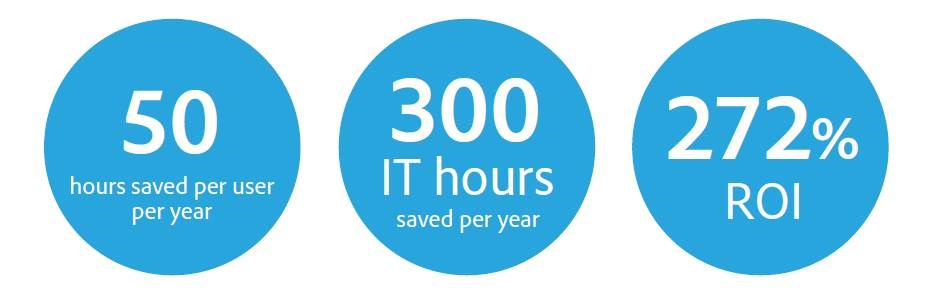
Acrobat DC enables IT efficiencies with easier PDF software administration, including license management, deployments, updates, and upgrades. Employees also save time by making document-intensive processes quicker and more seamless using tools to organize PDFs and improve end-to-end document workflows. Forrester Research completed a third-party benchmark study measuring the effectiveness and total economic impact of Acrobat DC. Read the study here.
What’s new in Acrobat DC?
- Simplified Share experience for viewing, reviewing, and signing
- Unified Sign tool for both signers and senders
- Guided Fill & Sign with new share options
- Reopen PDFs from the last Acrobat/Reader session
- Improved search experience
- Plus many more here.
Want to know more?
Micromail is Ireland’s only Adobe Worldwide Platinum Partner with over 15 years of a direct relationship. Talk to us about how the Adobe Value Incentive Program (VIP) is the best fit for your organisation to subscribe to Adobe products.